Halloween pet portrait ideas: cute costumes, familiar faces
By AIPetPortrait · Last updated:
You can make a Halloween picture without persuading your pet to wear a hat. Start with an ordinary photo you like, then choose an art style that adds the costume or atmosphere digitally. The useful question is whether you can still recognise the animal beneath the setting. A bright eye, a crooked ear or a white patch on the muzzle matters more than a crowded background.
Halloween falls on October 31. For your 2026 greeting, leave time to choose a photo, try a portrait and check the details before sharing. These seven directions keep the mood playful or quietly mysterious, without gore. All pictures here are AI-generated examples, not photographs of real pets.
Seven ways to give your pet a Halloween look
1. A pumpkin companion: Halloween
Choose Halloween for a recognisable seasonal scene with pumpkins, warm light and a cute costume mood. It is a good starting point when you want the occasion to be obvious at a glance. Use a photo where the ears are fully visible: a hat or decoration can otherwise hide one of your pet’s most familiar features. Check that the orange lighting has not changed a cream coat into a different colour.
Try a Halloween portrait ↗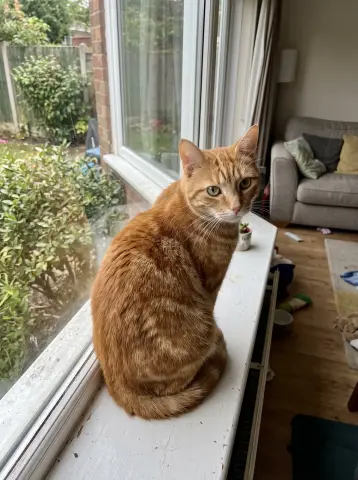 Original photo (AI-generated sample)
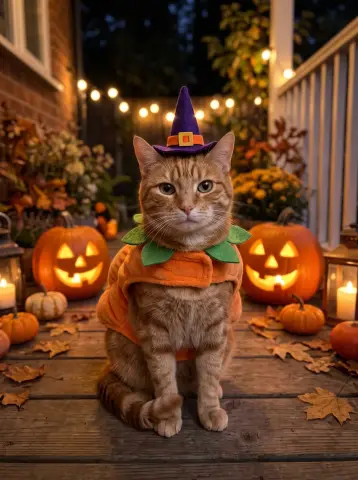 Halloween portrait
2. A quiet old-house portrait: Gothic
Gothic suits someone who prefers shadow, dark fabric and an old-fashioned mood to bright decorations. Think of a portrait hanging in a mysterious hallway, with the pet as the calm centre of the picture. Keep the result gentle: avoid sharing an image with frightening expressions or disturbing details. Dark fur needs particular attention because shadows can swallow the eyes and make the face difficult to recognise.
Try Gothic with your photo ↗3. A dressed-up visitor: Victorian
A Victorian portrait gives your pet formal period clothing and a more restrained costume-party feel. This works well for a digital invitation with room around the image for your own text. Choose a head-and-shoulders photo so the clothing does not become the main subject. Review collars, ruffles and ears carefully; generated fabric can overlap fur in ways that look odd when you enlarge the file.
Try Victorian ↗4. A brave little guardian: Knight
For a pet who watches the doorway, Knight offers a storybook costume direction. Armour should frame the animal rather than turn its body into a person. Look for natural paws, wings or hooves, and discard a result with human-looking hands. A simple forward-facing photo makes it easier to compare muzzle shape and eye spacing, even when the finished portrait adds elaborate clothing.
Try Knight ↗5. A colourful night scene: Neon Future
Neon Future gives you a different Halloween palette: coloured light instead of pumpkins and autumn leaves. It can suit a phone wallpaper or an evening party message. Strong blue and pink light may change the apparent colour of a coat, so compare markings as well as overall colour. Choose another result if the lighting hides the features you care about. There is no need for a familiar film costume or branded prop.
Try Neon Future ↗6. A caped companion: Superhero
The Superhero style uses a generic heroic costume. Your own animal should supply the personality, without a named character or franchise emblem. This is a cheerful choice for a family greeting. Check the chest, cape fastenings and background for stray symbols or lettering before you use the image. If the costume overwhelms the face, a closer source photo may give the portrait a clearer focus.
Try Superhero ↗7. A tiny game-like keepsake: Pixel Art
Pixel Art turns the portrait into visible blocks of colour. Use it for a small digital greeting or an avatar where a simplified silhouette reads well. Fine whiskers and subtle fur patterns may disappear, so judge recognition by ear shape, main markings and colour areas. Keep any card text outside the portrait. Pixel art is deliberately simplified; it is less suitable if every small facial detail is essential to you.
Try Pixel Art ↗Halloween examples for different pets
Compare the Halloween direction on a dog, cat, rabbit, horse and bird. The setting is an illustration of the style, not a promise of the exact costume or composition you will receive. Open your pet page for photo guidance, or use the button beneath each example to select Halloween and that pet type together.
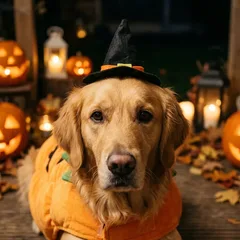 Dog photo tips ↗
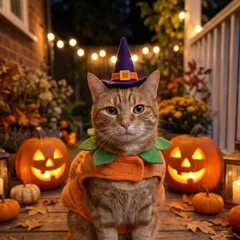 Cat photo tips ↗
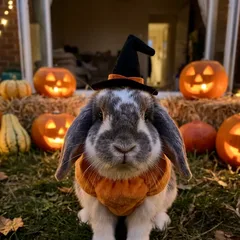 Rabbit photo tips ↗
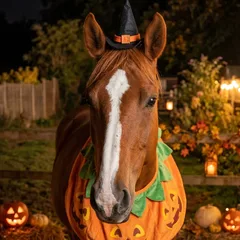 Horse photo tips ↗
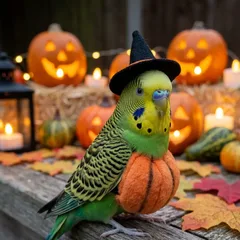 Bird photo tips ↗
Use an ordinary, clear source photo
You do not need a real costume. Let the tool add the seasonal scene, and give it a clear view of the animal instead. Take the photo near a window, at eye level, while your pet is comfortable. Keep both eyes, the full ears and important markings in frame. Avoid motion blur and heavy colour filters. Only animals are supported; do not upload a photo with identifiable people.
For several pets, use one photo with two or three clearly separate faces. Do not choose a tightly tangled group where you cannot tell whose paws or markings are whose. Our photo selection guide explains the checks in more detail. You can always start with an individual portrait if the group photo makes recognition difficult.
Turn the download into a greeting
Download a result you like, then place it in your own card layout or send it privately as a digital image. Add your greeting in an editor after generation so you control spelling and placement. Leave a margin around ears, hats and capes if you plan to crop the picture. A square social crop can cut away details that looked fine in the original portrait.
If you want a physical card, arrange printing yourself. We supply digital images only. Ask the printer about the file dimensions and intended card size before paying, and review a proof where possible. Generate early enough to change the image if the likeness feels wrong; neither generation nor a print preview guarantees a particular result.
Before you share
- Compare eyes, ears, muzzle and coat patches with the source.
- Look for natural animal anatomy and readable, uncluttered details.
- Keep the mood cute or gently mysterious, without gore.
- Add your own greeting outside the generated artwork.
- Download what you want to keep within 30 days.