Christmas pet portrait ideas for cards and thoughtful gifts
By AIPetPortrait · Last updated:
A Christmas pet portrait can start with a familiar everyday photo, rather than a staged holiday shoot. Choose the mood for the person receiving it: a cozy scene for a greeting, a dignified portrait for a frame, or something playful for a phone wallpaper. Your pet’s expression and markings should still be the centre of the image.
These seven Christmas pet portrait ideas map to styles you can select in the tool. They are digital images you download and use in your own card or gift layout. We do not supply printed cards, frames or shipping. All the examples below use AI-generated sample animals; your own result will depend on the photo and may change details.
Seven styles to match the recipient
1. Christmas: a cozy seasonal greeting
Christmas is the direct choice for a warm holiday setting and sweater-like costume mood. Use it when you want the occasion to be clear without adding lots of text. A photo with visible ears and a little space around the head gives you room to inspect the finished composition. Check that decorations do not cover the eyes and that warm lighting has not changed familiar coat colours.
Create a Christmas portrait ↗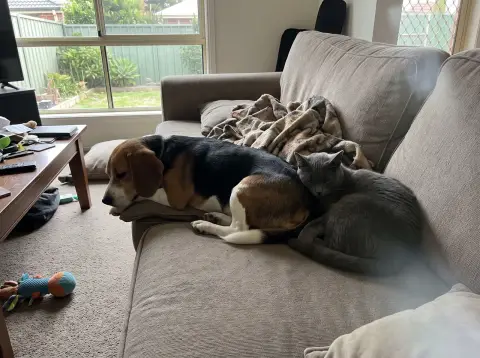 Original photo (AI-generated sample)
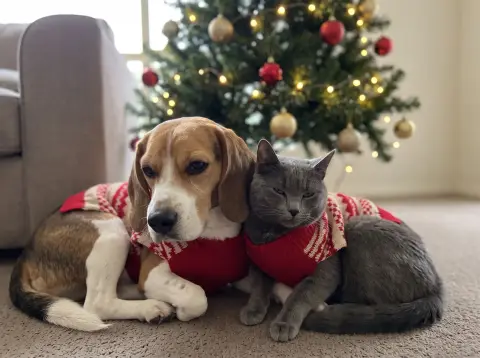 Christmas portrait
2. Royal: a formal portrait with a playful edge
A Royal portrait can suit the companion who already occupies the best chair. Robes and a crown give the image a formal gift feeling while leaving you room for a personal greeting outside the art. Choose a clear face photo and check the crown placement. The result should still read as the recipient’s animal, rather than an impressive costume with unfamiliar eyes or altered muzzle shape.
Try Royal ↗3. Watercolor: a softer card illustration
Watercolor is useful when you want an image that feels quieter than a costume scene. The painterly edges can sit comfortably within a simple card layout, with a short note below. Keep the background of your source photo uncomplicated where possible. Pale coats can lose their outlines against light areas, so look closely at the ears, chest and nose before choosing which result to download.
Try Watercolor ↗4. Plush: a toy-like digital surprise
Plush interprets your pet with a soft toy-like surface. It can make a cheerful digital greeting for someone who enjoys cute illustrations. This is a stylised image, not a physical toy or an offer to make one. Small markings may simplify into larger colour patches. Compare the main colours, ear position and face shape, and choose another style if the recipient values precise fur texture above the playful treatment.
Try Plush ↗5. Floral Crown: an alternative to holiday clothing
Floral Crown is a useful option when red sweaters and winter scenes do not suit the person or their climate. The portrait can remain relevant after the holidays. Review where flowers meet the ears and forehead so the decoration does not replace a distinctive feature. If you want specific wording on a card, add it yourself after downloading rather than expecting the generated image to spell a message correctly.
Try Floral Crown ↗6. Birthday: give a December birthday its own moment
For someone whose birthday falls in December, a separate Birthday portrait can feel more personal than combining every occasion into one Christmas card. Use a birthday-style result for the birthday message, then keep any holiday greeting separate. Check the image for stray lettering and for props overlapping the animal’s face. You can put the pet’s name and the date into your own layout, where you control both.
Try Birthday ↗7. Renaissance: a portrait to keep beyond December
Renaissance offers an oil-painting direction for a recipient who prefers a traditional portrait to seasonal novelty. It can be a good starting point for a gift you intend to print yourself. Look at brushwork around the eyes and facial patches; painterly texture can soften details you want preserved. Try a source image with clear natural light so you have a reliable reference when judging the result.
Try Renaissance ↗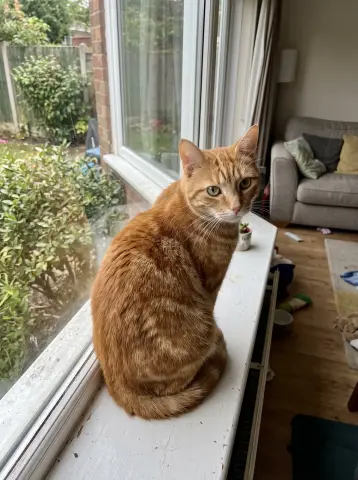 Original photo (AI-generated sample)
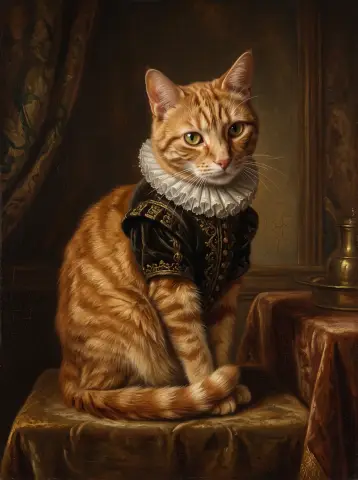 Renaissance portrait
Choose the photograph before the style
For a gift, use a photo you have permission to upload. Ask the owner for an original file if the only picture you have is a small screenshot. Choose visible eyes, full ears and familiar markings over a dramatic background. Avoid heavy filters, motion blur and photos with identifiable people. Our best-photo guide explains how to compare reference pictures and use phone portrait mode carefully.
A single pet is easier to inspect than an overlapping group. If you want two or three companions together, start with one photo in which all their faces are visible and their bodies are separate. Select Multiple Pets and check each animal individually after generation. For a family who has lost a pet, ask whether a remembrance image would be welcome; see our memorial portrait guide for a gentler approach.
Make the download into something personal
For a digital card, place the portrait beside a short message in an editor you already use. Leave blank space around the animal rather than squeezing text over the face. Send a preview to yourself and view it on a phone: small lettering can disappear, and a square crop may remove the ears or top of a crown. Keep a copy of the uncropped download as well as your finished greeting.
A digital gift can be as simple as the image and a note explaining why you chose that photograph. If you plan to print, tell the recipient that you arranged printing independently. We provide downloadable files, not a physical product. Avoid promising a specific print size until you have checked the actual image dimensions with your chosen printer.
Generate early and allow time to review
Do not leave the portrait until the moment you need to send it. Review the face at a larger size, compare it with the original and decide whether another source photo would help. A costume or soft painting treatment can look attractive while changing eye colour, nose shape or markings. Likeness is not guaranteed, and additional attempts use the applicable free allowance or credits.
For physical gifts, ask your own printer about turnaround, proofing and delivery before ordering. Those timings are outside this service. Check for blur or unwanted cropping in the proof and keep important details away from trim edges. Downloads are retained for up to 30 days in our app, so save the files you want to keep somewhere you control.
Your gift checklist
- Choose a photo you can use with permission, without identifiable people.
- Match the style to the recipient’s taste and the occasion.
- Compare eyes, markings, ears and animal anatomy with the original.
- Add names and greetings yourself after downloading.
- Check file dimensions and a proof before paying for your own print.
- Save your chosen digital images within 30 days.